Windows下构建Ubuntu环境
两种方案
可选:点击以支持我们的网站
ContentAutomationHub 的系统的核心模块和数据流:
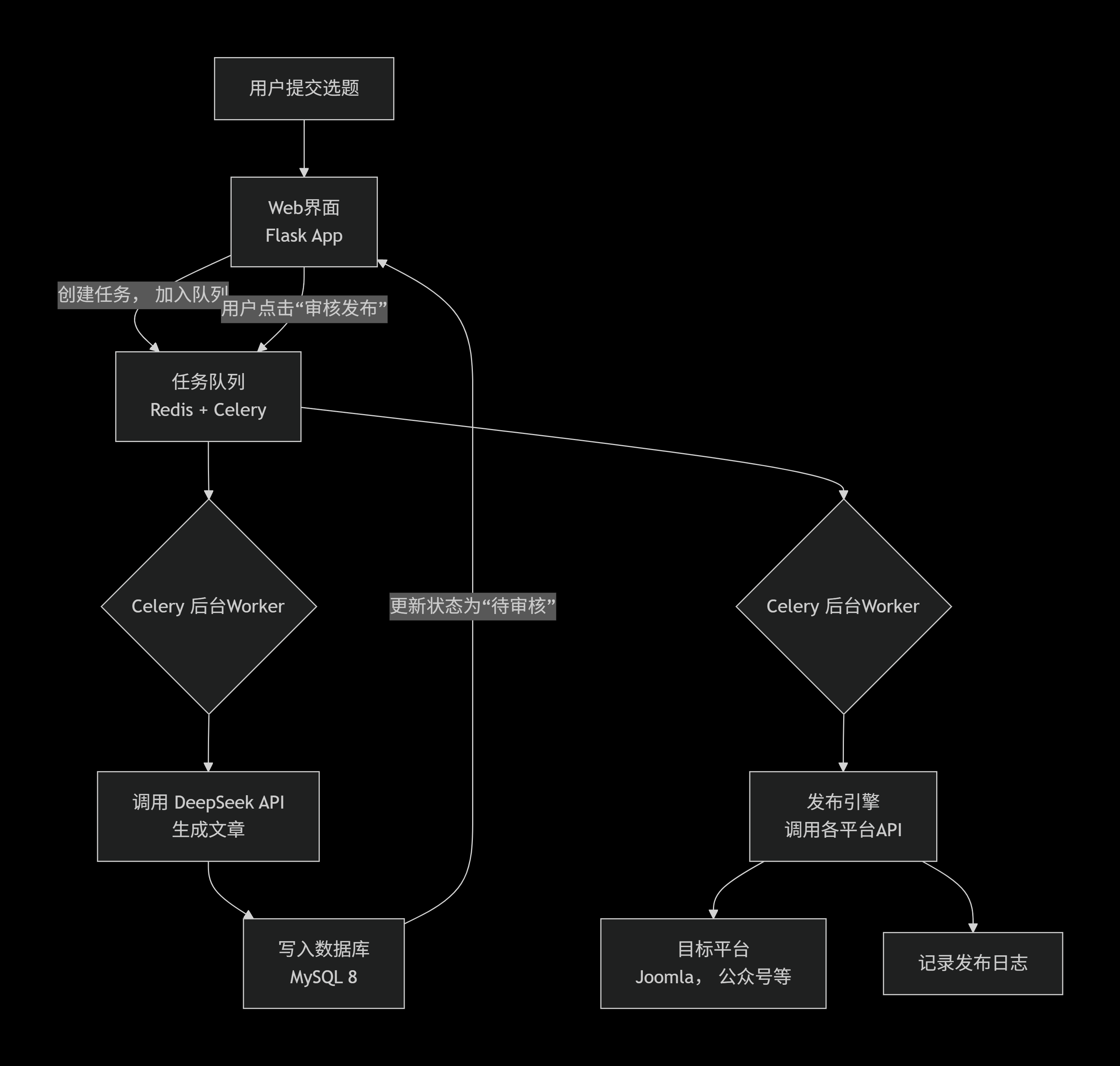
在您的Ubuntu服务器上执行以下命令:
sudo apt update
sudo apt install python3-pip python3-venv redis-server -y
sudo systemctl start redis && sudo systemctl enable redis
mkdir ~/ContentAutomationHub && cd ~/ContentAutomationHub
python3 -m venv venv
source venv/bin/activate
pip install flask celery redis requests sqlalchemy pymysql flask-cors
# 用于未来可能的API管理
pip install flask-restx
在MySQL中创建数据库 content_hub,然后执行以下SQL创建核心表:
-- 任务主表CREATE TABLE task ( id INT PRIMARY KEY AUTO_INCREMENT, title VARCHAR(255) NOT NULL COMMENT '选题标题', keywords TEXT COMMENT '关键词', status ENUM('pending', 'generating', 'review', 'publishing', 'published', 'failed') DEFAULT 'pending', ai_raw_content LONGTEXT COMMENT 'AI生成的原始内容', final_content LONGTEXT COMMENT '审核后的最终内容', created_at TIMESTAMP DEFAULT CURRENT_TIMESTAMP, updated_at TIMESTAMP DEFAULT CURRENT_TIMESTAMP ON UPDATE CURRENT_TIMESTAMP);
-- 发布平台配置表(安全存储各平台密钥)CREATE TABLE publish_platform ( id INT PRIMARY KEY AUTO_INCREMENT, name VARCHAR(50) NOT NULL COMMENT '如:joomla, wechat', config JSON COMMENT '存储API URL、密钥等JSON化配置', is_active BOOLEAN DEFAULT TRUE);
-- 发布日志表CREATE TABLE publish_log ( id INT PRIMARY KEY AUTO_INCREMENT, task_id INT, platform_id INT, status ENUM('success', 'failed'), response TEXT COMMENT '平台返回的原始响应', published_at TIMESTAMP DEFAULT CURRENT_TIMESTAMP, FOREIGN KEY (task_id) REFERENCES task(id), FOREIGN KEY (platform_id) REFERENCES publish_platform(id));
现在,开始创建最关键的几个Python模块。
1. 应用工厂与Celery配置 (app.py)
这是应用的启动核心,它初始化Flask和Celery。
# app.pyfrom flask import Flaskfrom celery import Celeryimport os
# 初始化Celerycelery = Celery( 'tasks', broker='redis://localhost:6379/0', backend='redis://localhost:6379/0')
def create_app(): app = Flask(__name__) app.config['SECRET_KEY'] = os.environ.get('SECRET_KEY', 'your-secret-key-here')
# 将Celery与App关联 celery.conf.update(app.config)
# 注册蓝图(后续定义) from routes import main_bp app.register_blueprint(main_bp)
return app
# 创建应用实例app = create_app()
2. 核心任务定义 (tasks.py)
这里定义了需要Celery在后台执行的异步任务,特别是调用AI和发布。
# tasks.pyfrom app import celeryimport requestsimport jsonfrom models import Task, db # 假设您用Flask-SQLAlchemy定义了模型
DEEPSEEK_API_URL = "https://api.deepseek.com/v1/chat/completions"DEEPSEEK_API_KEY = "your-deepseek-api-key" # 务必从环境变量读取!
@celery.task(bind=True)def generate_article(self, task_id): """任务1:调用DeepSeek生成文章""" task = Task.query.get(task_id) if not task: return
task.status = 'generating' db.session.commit()
headers = { 'Authorization': f'Bearer {DEEPSEEK_API_KEY}', 'Content-Type': 'application/json' } # 精心设计的提示词,是生成高质量文章的关键 prompt = f"你是一位资深的电子通信技术专家。请以'{task.title}'为题,撰写一篇深入的技术文章。要求:专业严谨、逻辑清晰、包含实例,字数在1500字左右。关键词:{task.keywords}"
payload = { "model": "deepseek-chat", "messages": [{"role": "user", "content": prompt}], "temperature": 0.7 }
try: response = requests.post(DEEPSEEK_API_URL, headers=headers, json=payload, timeout=60) result = response.json() article_content = result['choices'][0]['message']['content']
task.ai_raw_content = article_content task.status = 'review' # 更新状态为待审核 db.session.commit() return {"success": True, "task_id": task_id} except Exception as e: task.status = 'failed' db.session.commit() return {"success": False, "error": str(e)}
@celery.task(bind=True)def publish_article(self, task_id, platform_list): """任务2:将审核后的文章发布到多个平台""" task = Task.query.get(task_id) if task.status != 'review': return
task.status = 'publishing' db.session.commit()
publish_results = [] for platform_name in platform_list: # 这里将调用您为每个平台编写的适配器 result = dispatch_to_platform(platform_name, task.final_content, task.title) publish_results.append(result)
# 记录日志到 publish_log 表(略) task.status = 'published' db.session.commit() return publish_results
def dispatch_to_platform(platform_name, content, title): # 这里是一个分发器的示例,您需要为每个平台实现具体函数 platforms = { 'joomla': publish_to_joomla, 'wechat': publish_to_wechat, # 微信公众号 # ... 其他平台 } func = platforms.get(platform_name) return func(content, title) if func else {"status": "failed", "error": "Unknown platform"}
3. Web路由与界面 (routes.py)
提供简单的Web界面供用户提交选题和审核。
# routes.pyfrom flask import Blueprint, render_template, request, jsonify, redirect, url_forfrom models import Task, dbfrom tasks import generate_article, publish_article
main_bp = Blueprint('main', __name__)
@main_bp.route('/')def index(): tasks = Task.query.order_by(Task.created_at.desc()).limit(10).all() return render_template('index.html', tasks=tasks) # 需要创建简单的前端模板
@main_bp.route('/submit_task', methods=['POST'])def submit_task(): title = request.form.get('title') keywords = request.form.get('keywords')
new_task = Task(title=title, keywords=keywords, status='pending') db.session.add(new_task) db.session.commit()
# 异步调用AI生成任务 generate_article.delay(new_task.id)
return redirect(url_for('main.index'))
@main_bp.route('/approve_and_publish/<int:task_id>', methods=['POST'])def approve_and_publish(task_id): task = Task.query.get(task_id) if task and task.status == 'review': # 假设前端通过表单传递了最终修改的内容 task.final_content = request.form.get('final_content', task.ai_raw_content) # 选择要发布的平台,例如: ['joomla', 'weibo'] platforms_to_publish = request.form.getlist('platforms')
# 异步调用发布任务 publish_article.delay(task_id, platforms_to_publish)
return jsonify({"status": "success", "message": "发布任务已启动"}) return jsonify({"status": "error", "message": "任务状态不允许发布"}), 400
4. 平台发布适配器示例 (platforms/joomla_publisher.py)
每个平台都需要一个这样的适配器。以Joomla为例(假设已安装API插件):
# platforms/joomla_publisher.pyimport requestsimport json
def publish_to_joomla(content, title, category_id=1): """ 发布到Joomla 假设您的Joomla已安装并配置了API插件,提供了/articles端点 """ joomla_config = { 'api_url': 'https://bluetooth.com.cn/api/index.php/v1/articles', 'api_key': 'your-joomla-api-token' }
headers = { 'X-API-KEY': joomla_config['api_key'], 'Content-Type': 'application/json' }
article_data = { 'title': title, 'alias': title.replace(' ', '-').lower(), 'articletext': content, 'state': 1, # 1表示发布,0表示未发布 'catid': category_id, 'language': '*' }
try: response = requests.post( joomla_config['api_url'], headers=headers, data=json.dumps(article_data), timeout=30 ) if response.status_code in [200, 201]: return {"platform": "joomla", "status": "success", "article_id": response.json().get('id')} else: return {"platform": "joomla", "status": "failed", "error": response.text} except Exception as e: return {"platform": "joomla", "status": "failed", "error": str(e)}
五、启动与部署
启动Redis服务:sudo systemctl start redis
启动Celery Worker(在项目目录下):
bashcelery -A tasks.celery worker --loglevel=info --pool=solo
启动Flask开发服务器:
bashexport FLASK_APP=app.pyflask run --host=0.0.0.0 --port=5000
访问应用:打开浏览器,访问 http://你的服务器IP:5000。
六、后续开发与关键建议
分阶段实施(至关重要!):
阶段一:只实现 Flask + Celery + DeepSeek API,完成“提交-生成-查看”闭环。
阶段二:实现 Joomla发布,这是您最核心的需求。
阶段三:逐个接入其他平台,每个平台的API集成都可能需要1-2天的专门研究。
安全加固:
所有API密钥(DeepSeek、各平台)务必通过环境变量读取,绝不能硬编码在代码中。
考虑为Flask应用添加用户认证(如使用Flask-Login)。
生产环境部署:
使用 Gunicorn 或 uWSGI 替代Flask开发服务器。
使用 Supervisor 或 Systemd 管理Celery Worker和Web进程,保证稳定性。
配置Nginx作为反向代理,处理HTTPS。
扩展性考虑:
在tasks.py中,可以为不同平台设置不同的任务队列(如queue='wechat'),实现优先级处理。
添加更完善的任务状态查询和重试机制。
您已经拥有了一个功能完整、架构清晰的蓝图。请立即从“阶段一”开始,先让Flask和Celery跑起来,成功调用一次DeepSeek API。