Deprecated: Method ReflectionProperty::setAccessible() is deprecated since 8.5, as it has no effect since PHP 8.1 in /var/www/html/plugins/system/falangdriver/falangdriver.php on line 534
AI Service platform - bluetooth蓝牙技术
广告

可选:点击以支持我们的网站

免费文章

Deprecated: Using null as the key parameter for array_key_exists() is deprecated, use an empty string instead in /var/www/html/libraries/CBLib/CB/Legacy/cbPluginHandler.php on line 323

Deprecated: Using null as the key parameter for array_key_exists() is deprecated, use an empty string instead in /var/www/html/libraries/CBLib/CB/Legacy/cbPluginHandler.php on line 323

Deprecated: Using null as the key parameter for array_key_exists() is deprecated, use an empty string instead in /var/www/html/libraries/CBLib/CB/Legacy/cbPluginHandler.php on line 323

Deprecated: Using null as the key parameter for array_key_exists() is deprecated, use an empty string instead in /var/www/html/libraries/CBLib/CB/Legacy/cbPluginHandler.php on line 323

Deprecated: Using null as the key parameter for array_key_exists() is deprecated, use an empty string instead in /var/www/html/libraries/CBLib/CB/Legacy/cbPluginHandler.php on line 323

Deprecated: Using null as an array offset is deprecated, use an empty string instead in /var/www/html/components/com_comprofiler/plugin/user/plug_cbjdownloads/cbjdownloads.php on line 49

Deprecated: Using null as an array offset is deprecated, use an empty string instead in /var/www/html/components/com_comprofiler/plugin/user/plug_cbblogs/cbblogs.php on line 48

Deprecated: Using null as an array offset is deprecated, use an empty string instead in /var/www/html/components/com_comprofiler/plugin/user/plug_cbarticles/cbarticles.php on line 47

AI Service platform

My work record everyday


Deprecated: strtotime(): Passing null to parameter #1 ($datetime) of type string is deprecated in /var/www/html/templates/ja_allure/html/com_content/category/blog_item.php on line 57

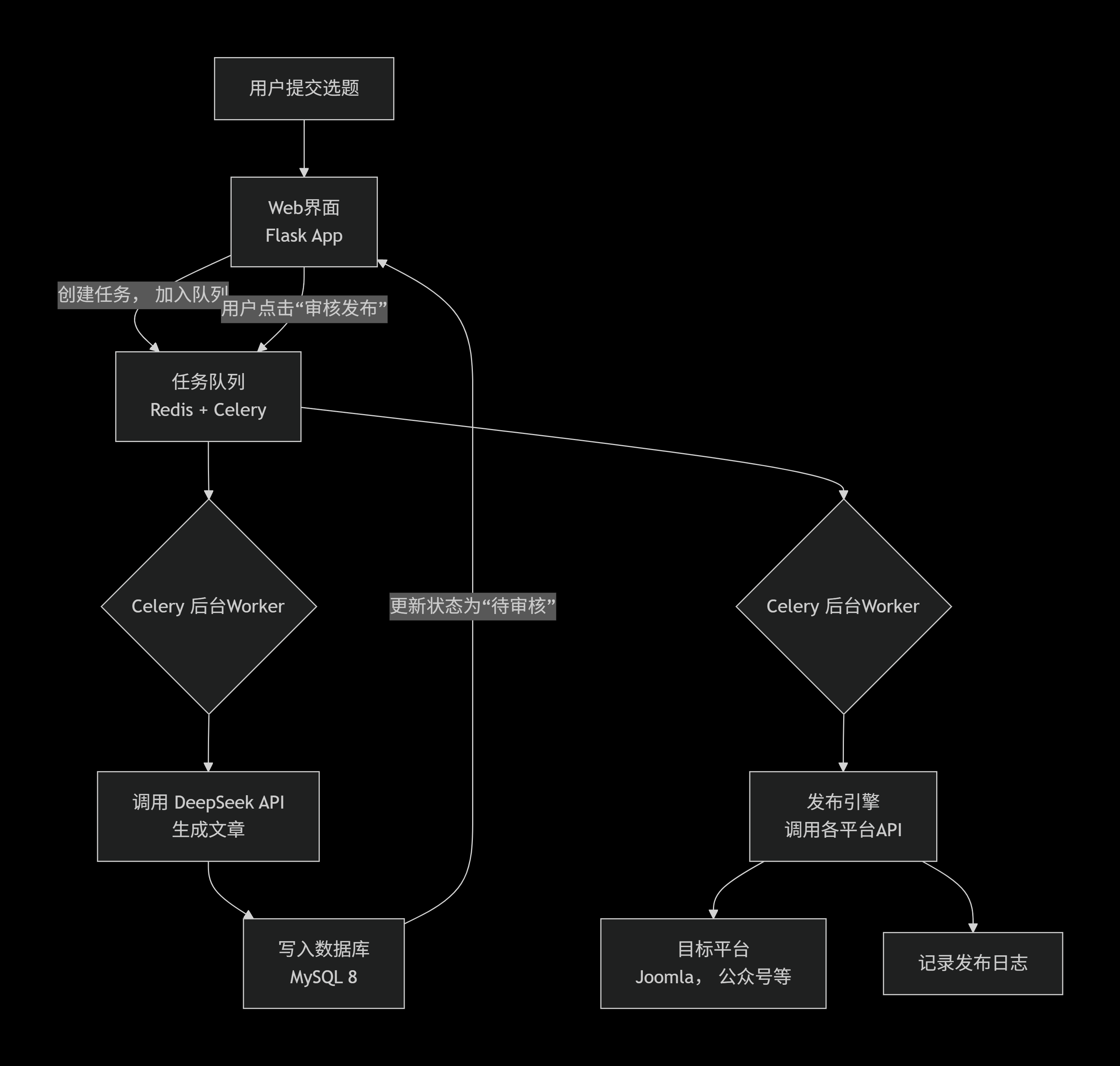
ContentAutomationHub 的系统的核心模块和数据流:

 ContentAutomationHub flow

二、环境配置与项目初始化

在您的Ubuntu服务器上执行以下命令:

  1. 安装系统依赖

sudo apt update
sudo apt install python3-pip python3-venv redis-server -y
sudo systemctl start redis && sudo systemctl enable redis

  1. 创建项目目录并初始化虚拟环境

      mkdir ~/ContentAutomationHub && cd ~/ContentAutomationHub

      python3 -m venv venv

      source venv/bin/activate

  1. 安装核心Python库

        pip install flask celery redis requests sqlalchemy pymysql flask-cors

        # 用于未来可能的API管理

        pip install flask-restx

三、数据库设计 (MySQL 8)

     在MySQL中创建数据库 content_hub,然后执行以下SQL创建核心表:


-- 任务主表
CREATE TABLE task (
id INT PRIMARY KEY AUTO_INCREMENT,
title VARCHAR(255) NOT NULL COMMENT '选题标题',
keywords TEXT COMMENT '关键词',
status ENUM('pending', 'generating', 'review', 'publishing', 'published', 'failed') DEFAULT 'pending',
ai_raw_content LONGTEXT COMMENT 'AI生成的原始内容',
final_content LONGTEXT COMMENT '审核后的最终内容',
created_at TIMESTAMP DEFAULT CURRENT_TIMESTAMP,
updated_at TIMESTAMP DEFAULT CURRENT_TIMESTAMP ON UPDATE CURRENT_TIMESTAMP
);

-- 发布平台配置表(安全存储各平台密钥)
CREATE TABLE publish_platform (
id INT PRIMARY KEY AUTO_INCREMENT,
name VARCHAR(50) NOT NULL COMMENT '如:joomla, wechat',
config JSON COMMENT '存储API URL、密钥等JSON化配置',
is_active BOOLEAN DEFAULT TRUE
);

-- 发布日志表
CREATE TABLE publish_log (
id INT PRIMARY KEY AUTO_INCREMENT,
task_id INT,
platform_id INT,
status ENUM('success', 'failed'),
response TEXT COMMENT '平台返回的原始响应',
published_at TIMESTAMP DEFAULT CURRENT_TIMESTAMP,
FOREIGN KEY (task_id) REFERENCES task(id),
FOREIGN KEY (platform_id) REFERENCES publish_platform(id)
);


四、核心模块代码实现

现在,开始创建最关键的几个Python模块。

1. 应用工厂与Celery配置 (app.py)
这是应用的启动核心,它初始化Flask和Celery。

# app.py
from flask import Flask
from celery import Celery
import os

# 初始化Celery
celery = Celery(
'tasks',
broker='redis://localhost:6379/0',
backend='redis://localhost:6379/0'
)

def create_app():
app = Flask(__name__)
app.config['SECRET_KEY'] = os.environ.get('SECRET_KEY', 'your-secret-key-here')

# 将Celery与App关联
celery.conf.update(app.config)

# 注册蓝图(后续定义)
from routes import main_bp
app.register_blueprint(main_bp)

return app

# 创建应用实例
app = create_app()


2. 核心任务定义 (tasks.py)
这里定义了需要Celery在后台执行的异步任务,特别是调用AI和发布。

# tasks.py
from app import celery
import requests
import json
from models import Task, db # 假设您用Flask-SQLAlchemy定义了模型

DEEPSEEK_API_URL = "https://api.deepseek.com/v1/chat/completions"
DEEPSEEK_API_KEY = "your-deepseek-api-key" # 务必从环境变量读取!

@celery.task(bind=True)
def generate_article(self, task_id):
"""任务1:调用DeepSeek生成文章"""
task = Task.query.get(task_id)
if not task:
return

task.status = 'generating'
db.session.commit()

headers = {
'Authorization': f'Bearer {DEEPSEEK_API_KEY}',
'Content-Type': 'application/json'
}
# 精心设计的提示词,是生成高质量文章的关键
prompt = f"你是一位资深的电子通信技术专家。请以'{task.title}'为题,撰写一篇深入的技术文章。要求:专业严谨、逻辑清晰、包含实例,字数在1500字左右。关键词:{task.keywords}"

payload = {
"model": "deepseek-chat",
"messages": [{"role": "user", "content": prompt}],
"temperature": 0.7
}

try:
response = requests.post(DEEPSEEK_API_URL, headers=headers, json=payload, timeout=60)
result = response.json()
article_content = result['choices'][0]['message']['content']

task.ai_raw_content = article_content
task.status = 'review' # 更新状态为待审核
db.session.commit()
return {"success": True, "task_id": task_id}
except Exception as e:
task.status = 'failed'
db.session.commit()
return {"success": False, "error": str(e)}

@celery.task(bind=True)
def publish_article(self, task_id, platform_list):
"""任务2:将审核后的文章发布到多个平台"""
task = Task.query.get(task_id)
if task.status != 'review':
return

task.status = 'publishing'
db.session.commit()

publish_results = []
for platform_name in platform_list:
# 这里将调用您为每个平台编写的适配器
result = dispatch_to_platform(platform_name, task.final_content, task.title)
publish_results.append(result)

# 记录日志到 publish_log 表(略)
task.status = 'published'
db.session.commit()
return publish_results

def dispatch_to_platform(platform_name, content, title):
# 这里是一个分发器的示例,您需要为每个平台实现具体函数
platforms = {
'joomla': publish_to_joomla,
'wechat': publish_to_wechat, # 微信公众号
# ... 其他平台
}
func = platforms.get(platform_name)
return func(content, title) if func else {"status": "failed", "error": "Unknown platform"}


3. Web路由与界面 (routes.py)
提供简单的Web界面供用户提交选题和审核。

# routes.py
from flask import Blueprint, render_template, request, jsonify, redirect, url_for
from models import Task, db
from tasks import generate_article, publish_article

main_bp = Blueprint('main', __name__)

@main_bp.route('/')
def index():
tasks = Task.query.order_by(Task.created_at.desc()).limit(10).all()
return render_template('index.html', tasks=tasks) # 需要创建简单的前端模板

@main_bp.route('/submit_task', methods=['POST'])
def submit_task():
title = request.form.get('title')
keywords = request.form.get('keywords')

new_task = Task(title=title, keywords=keywords, status='pending')
db.session.add(new_task)
db.session.commit()

# 异步调用AI生成任务
generate_article.delay(new_task.id)

return redirect(url_for('main.index'))

@main_bp.route('/approve_and_publish/<int:task_id>', methods=['POST'])
def approve_and_publish(task_id):
task = Task.query.get(task_id)
if task and task.status == 'review':
# 假设前端通过表单传递了最终修改的内容
task.final_content = request.form.get('final_content', task.ai_raw_content)
# 选择要发布的平台,例如: ['joomla', 'weibo']
platforms_to_publish = request.form.getlist('platforms')

# 异步调用发布任务
publish_article.delay(task_id, platforms_to_publish)

return jsonify({"status": "success", "message": "发布任务已启动"})
return jsonify({"status": "error", "message": "任务状态不允许发布"}), 400

4. 平台发布适配器示例 (platforms/joomla_publisher.py)
每个平台都需要一个这样的适配器。以Joomla为例(假设已安装API插件):

# platforms/joomla_publisher.py
import requests
import json

def publish_to_joomla(content, title, category_id=1):
"""
发布到Joomla
假设您的Joomla已安装并配置了API插件,提供了/articles端点
"""
joomla_config = {
'api_url': 'https://bluetooth.com.cn/api/index.php/v1/articles',
'api_key': 'your-joomla-api-token'
}

headers = {
'X-API-KEY': joomla_config['api_key'],
'Content-Type': 'application/json'
}

article_data = {
'title': title,
'alias': title.replace(' ', '-').lower(),
'articletext': content,
'state': 1, # 1表示发布,0表示未发布
'catid': category_id,
'language': '*'
}

try:
response = requests.post(
joomla_config['api_url'],
headers=headers,
data=json.dumps(article_data),
timeout=30
)
if response.status_code in [200, 201]:
return {"platform": "joomla", "status": "success", "article_id": response.json().get('id')}
else:
return {"platform": "joomla", "status": "failed", "error": response.text}
except Exception as e:
return {"platform": "joomla", "status": "failed", "error": str(e)}


五、启动与部署
启动Redis服务:sudo systemctl start redis

启动Celery Worker(在项目目录下):

bash
celery -A tasks.celery worker --loglevel=info --pool=solo
启动Flask开发服务器:

bash
export FLASK_APP=app.py
flask run --host=0.0.0.0 --port=5000
访问应用:打开浏览器,访问 http://你的服务器IP:5000。

六、后续开发与关键建议
分阶段实施(至关重要!):

阶段一:只实现 Flask + Celery + DeepSeek API,完成“提交-生成-查看”闭环。

阶段二:实现 Joomla发布,这是您最核心的需求。

阶段三:逐个接入其他平台,每个平台的API集成都可能需要1-2天的专门研究。

安全加固:

所有API密钥(DeepSeek、各平台)务必通过环境变量读取,绝不能硬编码在代码中。

考虑为Flask应用添加用户认证(如使用Flask-Login)。

生产环境部署:

使用 Gunicorn 或 uWSGI 替代Flask开发服务器。

使用 Supervisor 或 Systemd 管理Celery Worker和Web进程,保证稳定性。

配置Nginx作为反向代理,处理HTTPS。

扩展性考虑:

在tasks.py中,可以为不同平台设置不同的任务队列(如queue='wechat'),实现优先级处理。

添加更完善的任务状态查询和重试机制。

您已经拥有了一个功能完整、架构清晰的蓝图。请立即从“阶段一”开始,先让Flask和Celery跑起来,成功调用一次DeepSeek API。


Deprecated: strtotime(): Passing null to parameter #1 ($datetime) of type string is deprecated in /var/www/html/templates/ja_allure/html/com_content/category/blog_item.php on line 156

Deprecated: strtotime(): Passing null to parameter #1 ($datetime) of type string is deprecated in /var/www/html/templates/ja_allure/html/com_content/category/blog_item.php on line 57

期望的是一个需要全栈开发能力(包括前端界面、后端逻辑、数据库设计、多平台API集成)的复杂项目,比较难实现,因为需要大投入。

作为您的首席技术架构师和开发顾问,提供实现这个宏大构想的完整技术蓝图和一步步的行动指南。在Ubuntu服务器上实现这个系统。

📘 实现蓝图:从Make.com到自主系统

您提到的Make.com正是这个领域的专业工具。它核心提供了可视化编排、多应用连接和任务调度的能力。我们的目标,就是在您的服务器上,用代码实现其核心流程。

根据您的要求,提供两个具体的技术实现路径,并对比其优劣:

路径一:构建独立的Web应用(推荐)

这比直接开发Joomla扩展更灵活、可控。

  • 核心架构:一个独立于Joomla运行的Python Web应用,通过API与Joomla及其他平台通信。
  • 技术栈建议
    • 后端框架:Python Flask 或 FastAPI。它们轻量、灵活,非常适合构建API和处理自动化任务。
    • 任务队列Celery + Redis。这是关键!它能将“写文章”、“发布”这类耗时任务放到后台异步执行,避免网页卡死。
    • 前端界面:简单的HTML/JavaScript,或使用Vue/React构建更友好的操作面板。
    • 数据库:使用您已有的 MySQL 8 来存储任务、文章、平台配置等。
  • 为什么推荐此路径:与Joomla解耦,技术选型自由,功能扩展不受Joomla框架限制,可以独立部署和维护。您完全可以将其视为自己开发的、部署在私有服务器上的“迷你Make.com”。

路径二:开发Joomla 4扩展(组件)

这种方式与Joomla深度集成,但开发复杂度和限制较高。

  • 实现方式:需要遵循Joomla严格的扩展开发规范,创建自定义组件
  • 核心挑战
    1. 后台任务处理:Joomla本身是即时响应的Web框架,不擅长处理“AI写作”这种可能长达几分钟的后台异步任务。您仍然需要集成类似Celery的机制,这在Joomla中实现起来比较笨重。
    2. 开发复杂度:需要精通Joomla的MVC结构、数据库抽象层和权限系统。
  • 结论:除非您对Joomla开发非常熟悉且希望功能紧密嵌入后台,否则不推荐此路径。它会让一个本已复杂的项目变得更加复杂。

🛠️ 如何开始:您的分步行动手册

以下是为您量身定制的、基于路径一(独立Web应用)的启动步骤:

第1步:环境准备与基础框架搭建

  1. 在您的Ubuntu 22.04服务器上,确保已安装Python 3.10+、pip和虚拟环境工具。
  2. 为项目创建虚拟环境,并安装核心包:Flask, Celery, redis, requests, sqlalchemy (用于操作MySQL)。
  3. 初始化一个Flask应用,并配置好Celery,连接到Redis服务(需单独安装)。

第2步:设计核心数据库表

在您的MySQL 8中创建数据库,并设计几张核心表:

  • task:存储用户提交的“选题”,包含状态(待处理、生成中、待审核、已发布)。
  • article:存储AI生成的文章草稿、审核后的定稿。
  • publish_platform:存储您要发布的各个平台(如Joomla、微信公众号)的API配置信息。
  • publish_log:记录每次发布的日志,方便排查问题。

第3步:实现核心功能模块(编码重点)

这是您需要着手开发的核心Python模块:

  1. AI集成模块 (ai_writer.py)
    • 使用 requests 库调用 DeepSeek API
    • 精心设计“提示词”,让AI能根据“选题”生成符合您技术网站风格的文章。
  2. 发布引擎模块 (publisher.py)
    • 这是最繁琐但核心的部分。您需要为每个目标平台编写一个适配器
    • Joomla:通过安装API插件获取接口,使用HTTP请求发布文章。
    • 微信公众号/微博等:研究其官方开放平台的API文档,处理复杂的授权(OAuth2)和内容格式转换。
  3. 任务流程引擎 (orchestrator.py)
    • 使用Celery定义后台任务链:生成文章任务 -> (审核后)触发发布任务。
    • 发布任务会调用 publisher.py 中的各个适配器,向不同平台并行或串行发送请求。

第4步:构建用户操作界面

  1. 开发一个简单的Web页面,包含:
    • 一个输入框,用于提交“选题”。
    • 一个列表,展示所有任务的状态。
    • 在“待审核”任务旁,提供一个“审核通过并发布”的按钮。
  2. 这个按钮被点击后,后端会触发相应的Celery发布任务链。

💡 关键建议与提醒

  1. 从最小可行产品开始:不要试图一次性接入所有平台。强烈建议您分阶段开发
    • 第一阶段:只实现 提交选题 -> AI生成 -> 存入数据库,在网页上能看见草稿即可。
    • 第二阶段:实现 审核后,发布到您的Joomla网站。先打通一个最核心的闭环。
    • 第三阶段:再逐个攻克微信公众号、小红书等平台,每个平台的API集成都可能是一个小项目。
  2. 关注API限制与成本:DeepSeek API调用有费用,各社交平台的API也有调用频率限制。在代码中要做好异常处理和节奏控制。
  3. 安全第一:所有平台的API密钥(Token)都必须加密存储,绝不能硬编码在代码里。可以使用环境变量或配置文件。

Deprecated: strtotime(): Passing null to parameter #1 ($datetime) of type string is deprecated in /var/www/html/templates/ja_allure/html/com_content/category/blog_item.php on line 156

Deprecated: strtotime(): Passing null to parameter #1 ($datetime) of type string is deprecated in /var/www/html/templates/ja_allure/html/com_content/category/blog_item.php on line 57

Deprecated: strtotime(): Passing null to parameter #1 ($datetime) of type string is deprecated in /var/www/html/templates/ja_allure/html/com_content/category/blog_item.php on line 156
FaLang translation system by Faboba

登陆


Deprecated: Using null as the key parameter for array_key_exists() is deprecated, use an empty string instead in /var/www/html/libraries/CBLib/CB/Legacy/cbPluginHandler.php on line 323

Deprecated: Using null as the key parameter for array_key_exists() is deprecated, use an empty string instead in /var/www/html/libraries/CBLib/CB/Legacy/cbPluginHandler.php on line 323

Deprecated: Using null as the key parameter for array_key_exists() is deprecated, use an empty string instead in /var/www/html/libraries/CBLib/CB/Legacy/cbPluginHandler.php on line 323

Deprecated: Using null as the key parameter for array_key_exists() is deprecated, use an empty string instead in /var/www/html/libraries/CBLib/CB/Legacy/cbPluginHandler.php on line 323

Deprecated: Using null as the key parameter for array_key_exists() is deprecated, use an empty string instead in /var/www/html/libraries/CBLib/CB/Legacy/cbPluginHandler.php on line 323

Deprecated: Using null as an array offset is deprecated, use an empty string instead in /var/www/html/components/com_comprofiler/plugin/user/plug_cbjdownloads/cbjdownloads.php on line 49

Deprecated: Using null as an array offset is deprecated, use an empty string instead in /var/www/html/components/com_comprofiler/plugin/user/plug_cbblogs/cbblogs.php on line 48

Deprecated: Using null as an array offset is deprecated, use an empty string instead in /var/www/html/components/com_comprofiler/plugin/user/plug_cbarticles/cbarticles.php on line 47

Deprecated: Using null as the key parameter for array_key_exists() is deprecated, use an empty string instead in /var/www/html/libraries/CBLib/CB/Legacy/cbPluginHandler.php on line 323

Deprecated: Using null as an array offset is deprecated, use an empty string instead in /var/www/html/libraries/src/Menu/AbstractMenu.php on line 164

Deprecated: Using null as an array offset is deprecated, use an empty string instead in /var/www/html/libraries/CBLib/CB/Legacy/LegacyFoundationFunctions.php on line 217

Deprecated: Using null as an array offset is deprecated, use an empty string instead in /var/www/html/libraries/CBLib/CB/Legacy/LegacyFoundationFunctions.php on line 219

Deprecated: Using null as an array offset is deprecated, use an empty string instead in /var/www/html/libraries/CBLib/CB/Legacy/LegacyFoundationFunctions.php on line 227

Deprecated: Using null as an array offset is deprecated, use an empty string instead in /var/www/html/libraries/CBLib/CB/Legacy/LegacyFoundationFunctions.php on line 231

Deprecated: Using null as an array offset is deprecated, use an empty string instead in /var/www/html/libraries/CBLib/CB/Legacy/LegacyFoundationFunctions.php on line 234

Deprecated: Using null as an array offset is deprecated, use an empty string instead in /var/www/html/libraries/CBLib/CB/Legacy/LegacyFoundationFunctions.php on line 237

Deprecated: Using null as an array offset is deprecated, use an empty string instead in /var/www/html/libraries/CBLib/CB/Legacy/LegacyFoundationFunctions.php on line 239

Deprecated: Method ReflectionProperty::setAccessible() is deprecated since 8.5, as it has no effect since PHP 8.1 in /var/www/html/plugins/system/falangdriver/falangdriver.php on line 100

Deprecated: Method ReflectionProperty::setAccessible() is deprecated since 8.5, as it has no effect since PHP 8.1 in /var/www/html/plugins/system/falangdriver/falangdriver.php on line 100
mysqli object is already closed (500 Whoops, looks like something went wrong.)

Error

HTTP 500 Whoops, looks like something went wrong.

mysqli object is already closed

Exception

Error

  1. */
  2. public function disconnect()
  3. {
  4. // Close the connection.
  5. if (\is_callable([$this->connection, 'close'])) {
  6. $this->connection->close();
  7. }
  8. parent::disconnect();
  9. }
  1. */
  2. public function disconnect()
  3. {
  4. // Close the connection.
  5. if (\is_callable([$this->connection, 'close'])) {
  6. $this->connection->close();
  7. }
  8. parent::disconnect();
  9. }
  1. *
  2. * @since 2.0.0
  3. */
  4. public function __destruct()
  5. {
  6. $this->disconnect();
  7. }
  8. /**
  9. * Alter database's character set.
  10. *
DatabaseDriver->__destruct()

Stack Trace

Error
Error:
mysqli object is already closed

  at /var/www/html/libraries/vendor/joomla/database/src/Mysqli/MysqliDriver.php:318
  at mysqli->close()
     (/var/www/html/libraries/vendor/joomla/database/src/Mysqli/MysqliDriver.php:318)
  at Joomla\Database\Mysqli\MysqliDriver->disconnect()
     (/var/www/html/libraries/vendor/joomla/database/src/DatabaseDriver.php:496)
  at Joomla\Database\DatabaseDriver->__destruct()                

Deprecated: Method ReflectionProperty::setAccessible() is deprecated since 8.5, as it has no effect since PHP 8.1 in /var/www/html/plugins/system/falangdriver/falangdriver.php on line 100

Deprecated: Method ReflectionProperty::setAccessible() is deprecated since 8.5, as it has no effect since PHP 8.1 in /var/www/html/plugins/system/falangdriver/falangdriver.php on line 100